> For the complete documentation index, see [llms.txt](https://docs.innova-drilling.com/introduction/llms.txt). Markdown versions of documentation pages are available by appending `.md` to page URLs; this page is available as [Markdown](https://docs.innova-drilling.com/introduction/innova-engineering-manual/well-seeker-x-manual/11.0-reporting.md).
# 11.0 - Reporting
The Well Seeker X reporting feature allows the user to automate slide sheets and semi-automate the creation of daily drilling reports. Combined with Drill String Data, this builds a powerful package of job reporting and data for future data analysis.
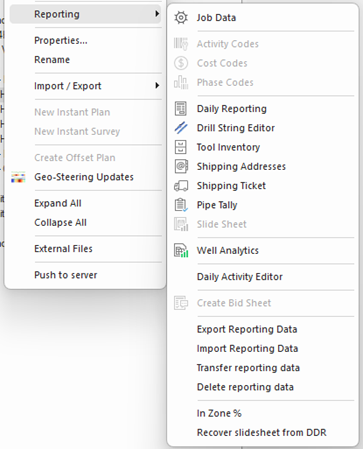
Reporting package features can be accessed through context menu in the Database tree, the Home ribbon, and a few additional tools from Daily Reports, Drill String and Slide Sheet dialogs.
Figure 238: Reporting Context Menu
Figure 239: Home Ribbon Daily Reporting Menu
It is suggested that data is input in the following order to increase input efficiency and reduce duplicate data entry. However, this is just a guide and the user can deviate from this sequence should they wish.
1. Input tool listing into [**Tool Inventory**](/introduction/innova-engineering-manual/well-seeker-x-manual/11.0-reporting/11.7-inventory.md). This will give the user the option to select these components when creating a BHA, reducing duplicate data entry.
2. Input/import the BHA for the upcoming run in the [**Drill String Editor**](/introduction/innova-engineering-manual/well-seeker-x-manual/11.0-reporting/11.6-drill-string-editor.md). Once created a BHA can be associated with a time and date window within daily reporting. This allows for sharing of data between [**Drill String Editor**](/introduction/innova-engineering-manual/well-seeker-x-manual/11.0-reporting/11.6-drill-string-editor.md) and [**Daily Reporting**](/introduction/innova-engineering-manual/well-seeker-x-manual/11.0-reporting/11.5-daily-reporting.md), including allocating tool performance and utilisation data.
3. Confirm/edit [**Activity Codes**](/introduction/innova-engineering-manual/well-seeker-x-manual/11.0-reporting/11.2-activity-codes.md), [**Cost Codes**](/introduction/innova-engineering-manual/well-seeker-x-manual/11.0-reporting/11.3-cost-codes.md) and [**Phase Codes**](/introduction/innova-engineering-manual/well-seeker-x-manual/11.0-reporting/11.4-phase-codes.md). These codes can be utilised in the [**Daily Reporting**](/introduction/innova-engineering-manual/well-seeker-x-manual/11.0-reporting/11.5-daily-reporting.md) dialog, and when referenced, are used by Well Seeker to generate the relevant KPI data. If the user is interested in reporting this data, it is important that these codes are set correctly at the start of the job.
4. Input/confirm [**Addresses**](/introduction/innova-engineering-manual/well-seeker-x-manual/11.0-reporting/11.8-shipping-addresses.md). Addresses can be selected in the shipping ticket dialog.
5. Fill in the [**Daily Reporting**](/introduction/innova-engineering-manual/well-seeker-x-manual/11.0-reporting/11.5-daily-reporting.md) and [**Shipping Ticket**](/introduction/innova-engineering-manual/well-seeker-x-manual/11.0-reporting/11.9-shipping-ticket.md) sections as required.
The user can populate the daily activity section of the daily report directly from the slide sheet. If it is the user’s intention to populate the daily report in this way, then input the drilling data into the [**Slide Sheet**](/introduction/innova-engineering-manual/well-seeker-x-manual/11.0-reporting/11.11-slide-sheet.md) over the relevant 00:00-24:00 time interval. Any time, the user saves the Slide Sheet data, the daily activity section of the [**Daily Reporting**](/introduction/innova-engineering-manual/well-seeker-x-manual/11.0-reporting/11.5-daily-reporting.md) dialog will be populated automatically with the relevant data.
The options in the context menu will be described in detail in the following sections.
---
# Agent Instructions
This documentation is published with GitBook. GitBook is the documentation platform designed so that both humans and AI agents can read, navigate, and reason over technical content effectively. Learn more at gitbook.com.
## Querying This Documentation
If you need additional information that is not directly available in this page, you can query the documentation by asking a question.
Perform an HTTP GET request on the following URL with the `ask` and `goal` query parameters:
```
GET https://docs.innova-drilling.com/introduction/innova-engineering-manual/well-seeker-x-manual/11.0-reporting.md?ask=&goal=
```
`ask` is the immediate question: it should be specific, self-contained, and written in natural language.
`goal` is what the user is ultimately trying to achieve, the reason they need the answer. Sharing it helps GitBook give you a better, more relevant answer. A goal is most helpful when it describes the outcome the user wants rather than restating the question. For example, with `ask=how do I create an API token`, a goal like `automate deployments from our CI pipeline` lets GitBook tailor the answer to that use case.
The response will contain a direct answer to the question and relevant excerpts and sources from the documentation.
Use this mechanism when the answer is not explicitly present in the current page, you need clarification or additional context, or you want to retrieve related documentation sections.