> For the complete documentation index, see [llms.txt](https://docs.innova-drilling.com/introduction/llms.txt). Markdown versions of documentation pages are available by appending `.md` to page URLs; this page is available as [Markdown](https://docs.innova-drilling.com/introduction/innova-engineering-manual/well-seeker-x-manual/11.0-reporting/11.11-slide-sheet/11.11.2-rig-state-settings.md).
# 11.11.2 - Rig State Settings
The Rig States Settings dialog is where the user configures how Well Seeker interprets incoming WITS data to decide what operation the rig is currently performing. It also allows the user to see what drilling parameter data is being sent through from WITS and is where the Motor Stall detection feature is housed.
If the user wishes to use the incoming WITS data to automatically populate the Slide Sheet, they must configure the **Thresholds** section and then **leave the Rig States Settings window open**.
For a step-by-step guide to setting up WITS to record slide information, see the [**Well Seeker X: WITS Setup Guide.**](https://docs.innova-drilling.com/introduction/innova-engineering-how-to-guides/well-seeker-x-guides/well-seeker-x-wits-setup-guide)

#### **Thresholds**
The Rig States Settings window deduces the current rig state (drilling, connection, trip in/out, etc) by comparing the incoming data against the thresholds defined by the user in this section.
**RPM:** If the incoming RPM value is below the threshold, the pipe is considered to be not rotating. If it is above, it is rotating. When drilling, this is used to decide if the string is sliding or rotary drilling. Recommended value is \~50% of the rotating RPM.
The RPM threshold uses a buffer, which can be configured in the **RPM Buffer Parameters** section. The software stores the number of RPM values entered in the *RPM Buffer Size* input, in the RPM Buffer. If at least *RPM Buffer Threshold* number of values are larger than the *RPM Threshold* then the rig state is Rotating. If not, it is sliding.
As an alternative to using the RPM Threshold, RPM Buffer Size and RPM Buffer Threshold, the user can toggle ON Advanced Slide Detect. See below for more details.
**Pump Pressure:** If the incoming standpipe pressure value is above the threshold value, then the pumps are considered on. If it is below the threshold, the pumps are off. Recommend value is between 0 and 100 psi.
**Hookload:** If the incoming hookload value is lower than the threshold, the string is considered in slips. If it is above, then it is out of slips. Recommended value is block weight + 50%.
**On Bottom Delta:** The program calculates the difference between the Bit Depth and the total Hole Depth. If this value is smaller than the On Bottom Delta, then the bit is considered on bottom. If it is larger, then the bit is off bottom. Recommended value is less than 1 foot or metre.
**Stall Pressure:** Determines how much pressure is required above the average standpipe pressure for a motor stall to be automatically recorded in the Motor Stalls record. This can be viewed by clicking on the **Motor Stalls** option in the Slide Sheet menu ribbon. Pressure and flow data used to detect stalls can be viewed in the **Stall Detection** section.
**Mag to Grav X/O:** Angle at which the MWD tool has been set to change from transmitting magnetic to gravity tool face values.
**Auto Thresholds:** When YES is selected, Well Seeker will adjust the RPM and Hookload thresholds values dynamically and prevent the user from editing those thresholds. If NO is selected then all thresholds are editable and static. If a block weight has been entered in the **Rig Names** dialog, the software will use *block weight x 1.5* as the starting hookload value.
**Advanced Slide Detect:** As an alternative to using the RPM Threshold, RPM Buffer Size and RPM Buffer Threshold, the user can toggle ON Advanced Slide Detect. In this mode, instead of inspecting the RPM, the software inspects the incoming torque values. If the torque values are oscillating in a sinusoidal pattern, the string is recognised as Sliding. If not, Rotating. Incoming torque values can be seen in the section below the Thresholds section.
This setting is advised to be set to NO by default. Set to YES where sliding intervals are not being detected, due to RPM data values not displaying oscillation variation i.e., flatlining for multiple data points.
#### **Current WITS Data, Drilling Params & Sliding TF**
**Current WITS Data:** This section allows the user to view the most recently received WITS data points.
**Drilling Params:** This section allows the user to view the most recent drilling parameter values, based on the most recently received WITS data and the rig state.
**Sliding TF:** If tool face data is being transmitted via WITS, the user can see the latest toolface in this section, as well as calculated values for the ETF and Grade since the last connection.
#### **Current Rig State**
This section displays what activity Well Seeker deduces the rig is currently performing, based on the latest parameters received from WITS/WITSML.
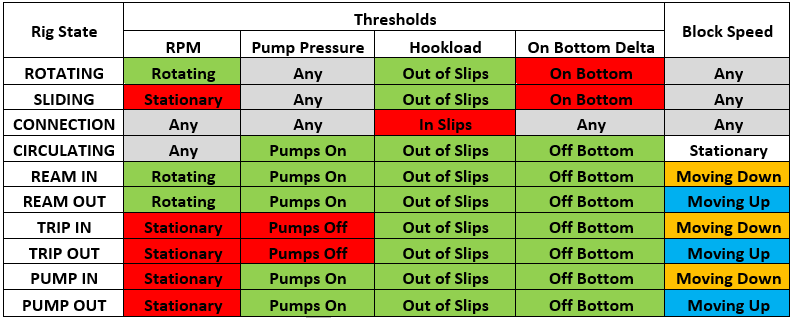
Each state displayed in the RigState field corresponds to a specific combination of threshold values and travelling block direction. The combination required for each is displayed in the table below.
If a cell is filled in GREEN then the value is above the threshold. If it is filled in RED then it is below the threshold. Cells filled in grey can be either above or below.
Figure 318: Current Rig State logic
If the combination of thresholds and block speed does not match with one of the rig states listed here, the displayed rig state will be UNKOWN.
#### **Timers**
This section displays the total amount of time that Well Seeker registers the pumps being on, the string being in slips, the string being off bottom, and the time taken surveying.
#### **Status Check**
**Live Tool Faces Enabled:** This will be checked if live tool face data is being received across WITS.
**Live Rig States Enabled:** This will be checked if the **Start** button has been clicked in the Rig States section of the menu ribbon, and the slide sheet is being automatically filled in.
**WITS Reader Running:** This will be checked if a WITS reader is open and receiving updates.
**Simulator:** Opens the Rig States simulator. This can be used to generate a fake WITS feed for debugging and demonstration purposes. It should never be used during real drilling operations.
---
# Agent Instructions
This documentation is published with GitBook. GitBook is the documentation platform designed so that both humans and AI agents can read, navigate, and reason over technical content effectively. Learn more at gitbook.com.
## Querying This Documentation
If you need additional information that is not directly available in this page, you can query the documentation by asking a question.
Perform an HTTP GET request on the following URL with the `ask` and `goal` query parameters:
```
GET https://docs.innova-drilling.com/introduction/innova-engineering-manual/well-seeker-x-manual/11.0-reporting/11.11-slide-sheet/11.11.2-rig-state-settings.md?ask=&goal=
```
`ask` is the immediate question: it should be specific, self-contained, and written in natural language.
`goal` is what the user is ultimately trying to achieve, the reason they need the answer. Sharing it helps GitBook give you a better, more relevant answer. A goal is most helpful when it describes the outcome the user wants rather than restating the question. For example, with `ask=how do I create an API token`, a goal like `automate deployments from our CI pipeline` lets GitBook tailor the answer to that use case.
The response will contain a direct answer to the question and relevant excerpts and sources from the documentation.
Use this mechanism when the answer is not explicitly present in the current page, you need clarification or additional context, or you want to retrieve related documentation sections.