> For the complete documentation index, see [llms.txt](https://docs.innova-drilling.com/introduction/llms.txt). Markdown versions of documentation pages are available by appending `.md` to page URLs; this page is available as [Markdown](https://docs.innova-drilling.com/introduction/innova-engineering-manual/well-seeker-x-manual/11.0-reporting/11.2-activity-codes.md).
# 11.2 - Activity Codes
This option can also be accessed via the ribbon, Home > Codes > Activity Codes, via the search bar in the top right of the screen, or directly from the Daily Reporting dialog ribbon.
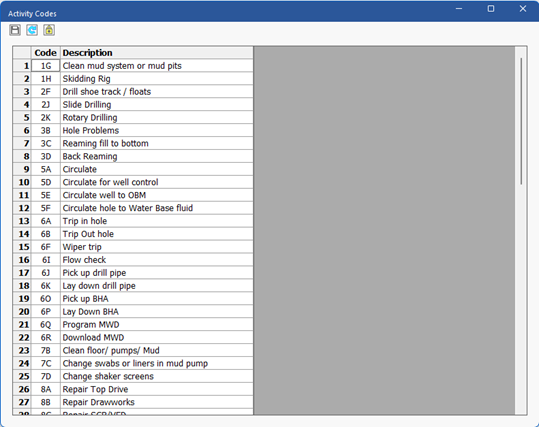
These codes are used in the Daily Activities section of the Daily Reporting package and utilised for KPI Tracking Graphs and automatic calculations of Drilling Parameter and Drilling Summary data when selected.
Figure 241: Activity Codes dialog and toolbar
The toolbar at the top of window contains additional functions:
**Save:** Saves any changes made.
**Reset to defaults:** Reset all the activity codes to the Well Seeker default.
**Lock:** If the associated Operator Properties have been locked, the Activity Codes will also be locked. Clicking on the Lock button will unlock them. If a password has been set in the associated Operator Properties, it will need to be entered before the window can be unlocked.
### 11.2.1 - Important Activity Codes
Most activity codes are arbitrary and do not have any specific function beyond allowing the user to differentiate between different activities in reports and KPI results. They can be added, removed, and modified without affecting the Daily Reporting package. However, some codes do have special functions which the user should be aware of:
* **2K (Rotary Drilling) and 2J (Slide Drilling):** Any code beginning with the number 2 is recognised by the software as drilling activity, allowing it to record drilling hours, distances and differentiate between slide and rotation. 2K and 2J are the most important of these codes as they are the default codes used to populate the Daily Activity grid using data from the Slide Sheet. The user should make sure that 2K and 2J are always present and active in the Activity codes.
* **Codes starting with 5:** Codes starting with the number 5 are recorded as circulating hours by the software. The exception to this rule is code 10C (Reshoot, surveys, cycle pumps, downlink tools), which will also count as circulating time.
* **6O:** Pick up BHA code. Must be present for each BHA for run data to be calculated correctly.
* **6P:** Lay down BHA code. Must be present for each BHA for run data to be calculated correctly.
* **Codes starting with 8:** Codes starting with the number 8 are highlighted in red in the Daily Activity grid and are counted as rig non-productive time (NPT).
* **Codes starting with 26:** Codes starting with the number 26 are highlighted in red in the Daily Activity grid and are counted as directional non-productive time (NPT). By default, there are no 26 codes included so the user will need to add them manually if they wish to record directional NPT.
* **3Z (Sidetrack):** Allows the user to change the current hole depth recorded in the daily report. The only other way to do this is with a drilling activity (code 2), which counts as drilling time. 3Z allows the user to change the hole depth (e.g., when pulling back to a sidetrack KOP) without affecting recorded drilling time.
Note that Well Seeker X uses the code for these activities to recognise them. All code descriptions are arbitrary and can be changed without affecting Daily Reporting functions.
---
# Agent Instructions
This documentation is published with GitBook. GitBook is the documentation platform designed so that both humans and AI agents can read, navigate, and reason over technical content effectively. Learn more at gitbook.com.
## Querying This Documentation
If you need additional information that is not directly available in this page, you can query the documentation by asking a question.
Perform an HTTP GET request on the following URL with the `ask` and `goal` query parameters:
```
GET https://docs.innova-drilling.com/introduction/innova-engineering-manual/well-seeker-x-manual/11.0-reporting/11.2-activity-codes.md?ask=&goal=
```
`ask` is the immediate question: it should be specific, self-contained, and written in natural language.
`goal` is what the user is ultimately trying to achieve, the reason they need the answer. Sharing it helps GitBook give you a better, more relevant answer. A goal is most helpful when it describes the outcome the user wants rather than restating the question. For example, with `ask=how do I create an API token`, a goal like `automate deployments from our CI pipeline` lets GitBook tailor the answer to that use case.
The response will contain a direct answer to the question and relevant excerpts and sources from the documentation.
Use this mechanism when the answer is not explicitly present in the current page, you need clarification or additional context, or you want to retrieve related documentation sections.