# 8.2.4 - EDM
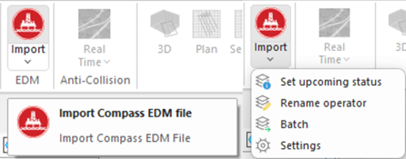
This section contains features for importing Compass EDM export files.
Figure 120: Import EDM options
### **8.2.4.1 - Import Compass EDM file**
This option allows Compass **edm.xml** files to be imported into Well Seeker. Select the desired file in the Open File dialog window and click on ‘Open’. Well Seeker will import targets, lease lines, survey error models and well plans according to the settings chosen.
Well Seeker X requires all items in the same database tree level to have a unique name, whilst Compass does not. To avoid conflicts Well Seeker will modify names at the field, facility, well and actual/plan level when importing a Compass EDM. The logic that the software uses is described below:
Operator: Well Seeker will use the name of the operator stored in the EDM.
Field: Well Seeker will append the name of the operator to the end of the field name stored in the EDM.
Facility: The facility will use the name of the facility stored in the EDM and will not append the field name to it.
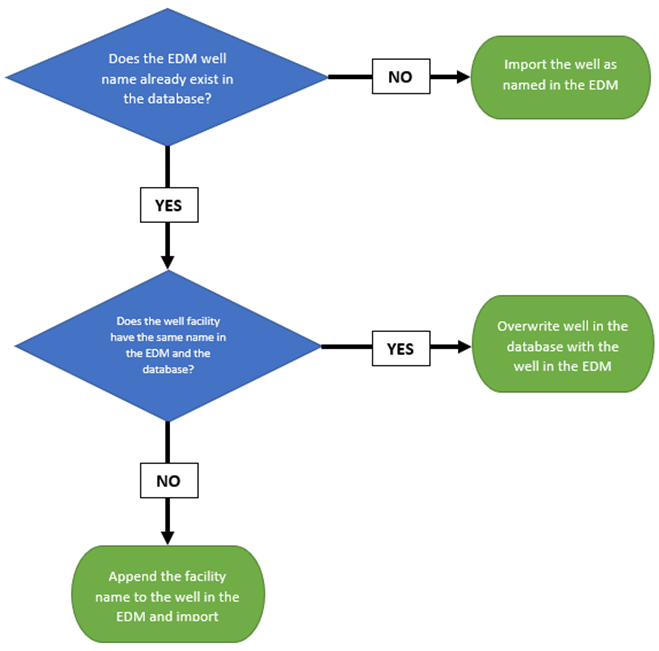
Well: The well may or may not have the facility name appended to the end of it, depending on the logic shown in the flow chart below:
Figure 121: Naming convention logic when importing a Compass EDM
Actual Well and Plan: Actual wells and plans will always have the name of the well appended to them as a prefix.
### **8.2.4.2 - Set upcoming status**
This works the same as the standard import EDM function but sets the status of all imported actual wells to upcoming.
### **8.2.4.3 - Rename Operator**
This option displays a list of the operators that already exist in the database. The user selects an operator and then imports an EDM file as normal. All of the wells will be imported under the selected operator instead of their assigned operators in the EDM file.
### **8.2.4.4 - Batch**
This option functions the same as the standard import Compass EDM file option, but allows the user to select multiple Compass **.xml** files to import at the same time. Note that depending on the number and size of the Compass files being imported, the import process can take a long time to complete.
### **8.2.4.5 - Settings**
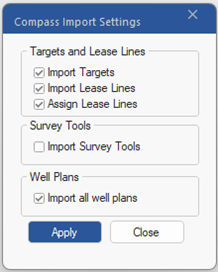
This option opens the compass import settings dialog, where the user can select the appropriate settings that they desire when importing data from a Compass EDM file.
Figure 122: Compass Import Settings
**Targets and Lease Lines:** Allows the user to either include or omit targets and lease lines when importing. The user can also choose to assign lease lines to their associated wells. If not, the user must assign them manually in the Targets window.
**Surveys Tools:** When checked, Well Seeker will import any survey tools associated with the relevant plans and surveys. If unchecked no survey tools will be imported. Note, that if survey tools are not imported, and any of the imported plans and surveys reference a survey tool which is not available on the imported computer, then Well Seeker will use the default error model selected by the user.
**Well Plans:** This option allows the user to import ALL plans which are contained within a Compass Export file. If this option is not selected, then Well Seeker will only pull in the plans which are selected as **PRINCIPAL** in the export file. Default is **ON**.